

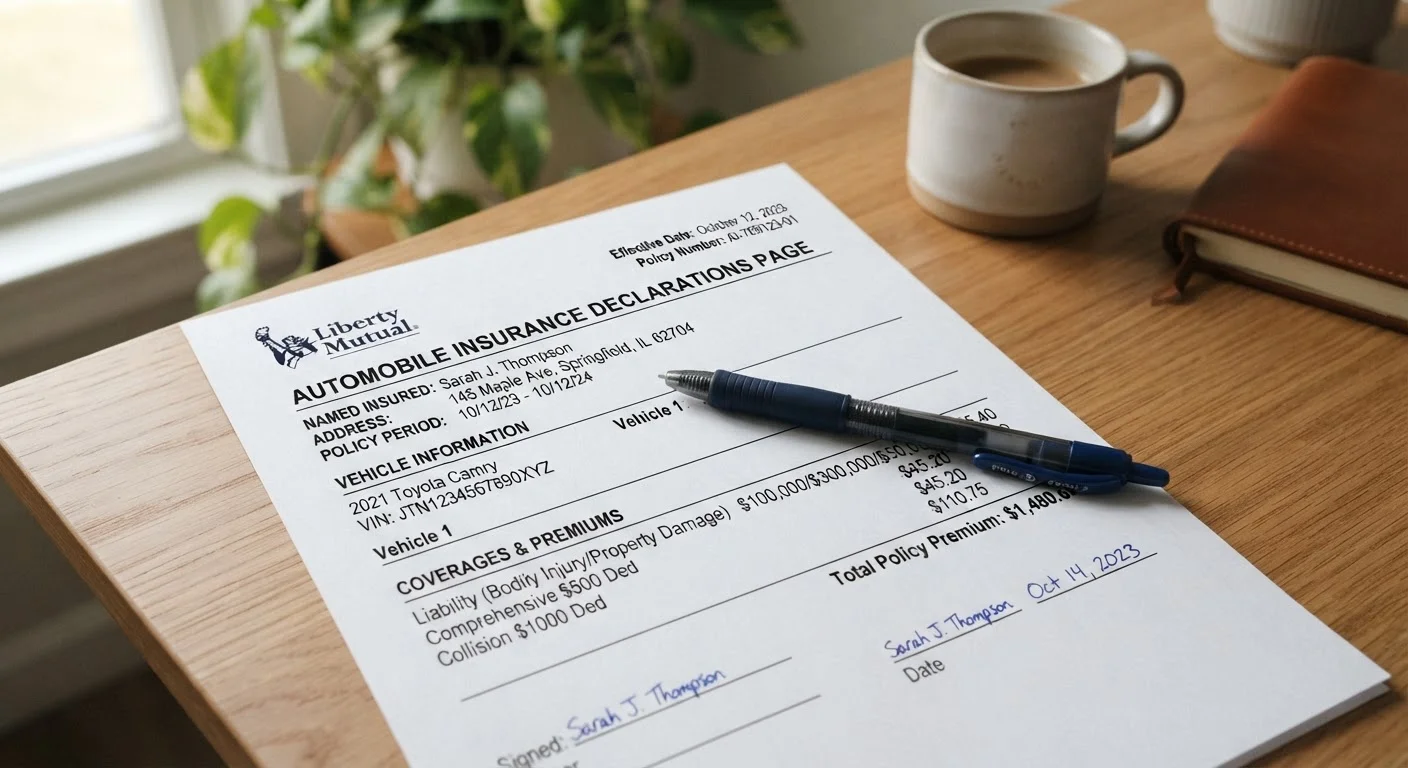
What Is an Auto Insurance Declarations Page?
The declarations page is the summary document that sits at the front of every auto insurance policy. Think of it as the policy's cover sheet: it condenses who is covered, what vehicles are insured, which coverages are active, and how much those coverages cost - all onto one or two pages. While the full policy document runs many pages and contains definitions, exclusions, and legal language, the dec page is the quick-reference you reach for first.
Insurers are required to provide a dec page whenever a policy is issued or renewed. You may receive it by mail, email, or through your insurer's online portal. Keeping it accessible is worthwhile - lenders, lienholders, and even some landlords may ask to see it as proof of coverage.
What you will need
Understanding your dec page is also the foundation for smarter policy decisions at renewal. Our annual renewal checklist builds directly on what you learn here.
What Each Section of the Dec Page Means
Once you have your dec page in hand, follow the steps below to read through it systematically. Each section of the document serves a specific purpose, and knowing what to look for makes it straightforward to verify accuracy and spot potential gaps.
Auto Insurance Declarations Page
The primary document you will be reading and verifying throughout this guide.
Insurer's Online Account Portal
Allows you to download the latest dec page and compare it against prior versions.
Vehicle Registration or Title
Used to cross-check your vehicle's VIN and ownership details against what appears on the dec page.
Locate your declarations page
Your insurer mails or emails a declarations page - commonly called a dec page - each time a new policy is issued or an existing one renews. Check your email inbox, insurer's online portal, or physical mail for a document labeled "Declarations" or "Policy Declarations." It is typically one to two pages long and appears at the very front of your policy packet.
Confirm the named insured and policy period
At the top of the dec page you will find the named insured - the person (or people) the policy is issued to - along with the policy number and the policy period, which shows the exact start and end dates of coverage. Verify your legal name is spelled correctly and that the policy period matches what you agreed to when purchasing or renewing.
Review the listed vehicles
Every vehicle covered under the policy will appear in a vehicle schedule, usually showing the year, make, model, and Vehicle Identification Number (VIN). Cross-check each entry against your registration or title. If you have added, removed, or replaced a vehicle since the last renewal, confirm those changes are accurately reflected here.
Identify all listed drivers
The dec page lists rated drivers - household members and regular operators whose driving history was factored into your premium. Check that all regular drivers in your household are listed. An unlisted regular driver may create a coverage dispute if they are involved in an accident.
Understand your coverage types and limits
This is the most detailed section of the dec page. Each coverage type appears alongside its limit - the maximum your insurer will pay for a covered loss. Common entries include:
- Bodily Injury Liability - expressed as split limits (e.g., $100,000/$300,000) or a single combined limit
- Property Damage Liability - covers damage you cause to others' property
- Collision - pays to repair your vehicle after a collision, regardless of fault
- Comprehensive - covers non-collision events like theft, weather damage, or fire
- Uninsured/Underinsured Motorist - protects you when the at-fault driver carries little or no insurance
- Medical Payments or Personal Injury Protection (PIP) - covers medical costs for you and passengers
For a plain-language explanation of what each type actually protects, see our coverage types guide.
Note your deductibles
Next to collision and comprehensive coverage, you will see a deductible - the dollar amount you pay out of pocket before insurance kicks in. A higher deductible generally means a lower premium, and vice versa. Confirm the deductible amounts shown match what you selected, and make sure you could realistically cover that amount if you needed to file a claim tomorrow.
Review your premium breakdown and any endorsements
The dec page shows your total premium for the policy period, often broken down by coverage type and by vehicle. It also lists any endorsements - add-ons or modifications to the standard policy, such as rental reimbursement, roadside assistance, or gap coverage. Review endorsements to confirm you are paying only for what you have chosen, and that nothing is missing.
Don't Confuse Limits With Full Coverage
A coverage type appearing on your dec page only protects you up to its listed limit. If a claim exceeds that limit, you are responsible for the difference. Review your limits annually to make sure they still reflect your actual financial exposure.
Keep a Digital Copy Within Reach
Most insurers allow you to download your declarations page through their online portal or mobile app. Store a copy in a cloud folder or email it to yourself so you can access it anywhere - especially useful if you need to reference coverage details after an accident.
Errors Can Affect Your Claim
If your declarations page lists the wrong vehicle, driver, or address, your insurer could dispute a claim. Review every detail when you receive a new or renewed dec page. Contact your agent promptly if anything is inaccurate or out of date.
After you have reviewed your dec page, consider whether your overall policy still fits your situation. Our guide on smart habits for keeping your auto insurance working in your favor outlines the practices that help you stay properly protected over time.
This article provides general information about auto insurance documents and is not a substitute for personalised advice from a licensed insurance agent. Coverage terms, limits, and requirements vary by insurer and by state. Always read your actual policy documents and consult a licensed professional for guidance specific to your situation.
The content on this site is for informational purposes only and is not a substitute for professional advice. Always consult a qualified professional for guidance specific to your situation.