

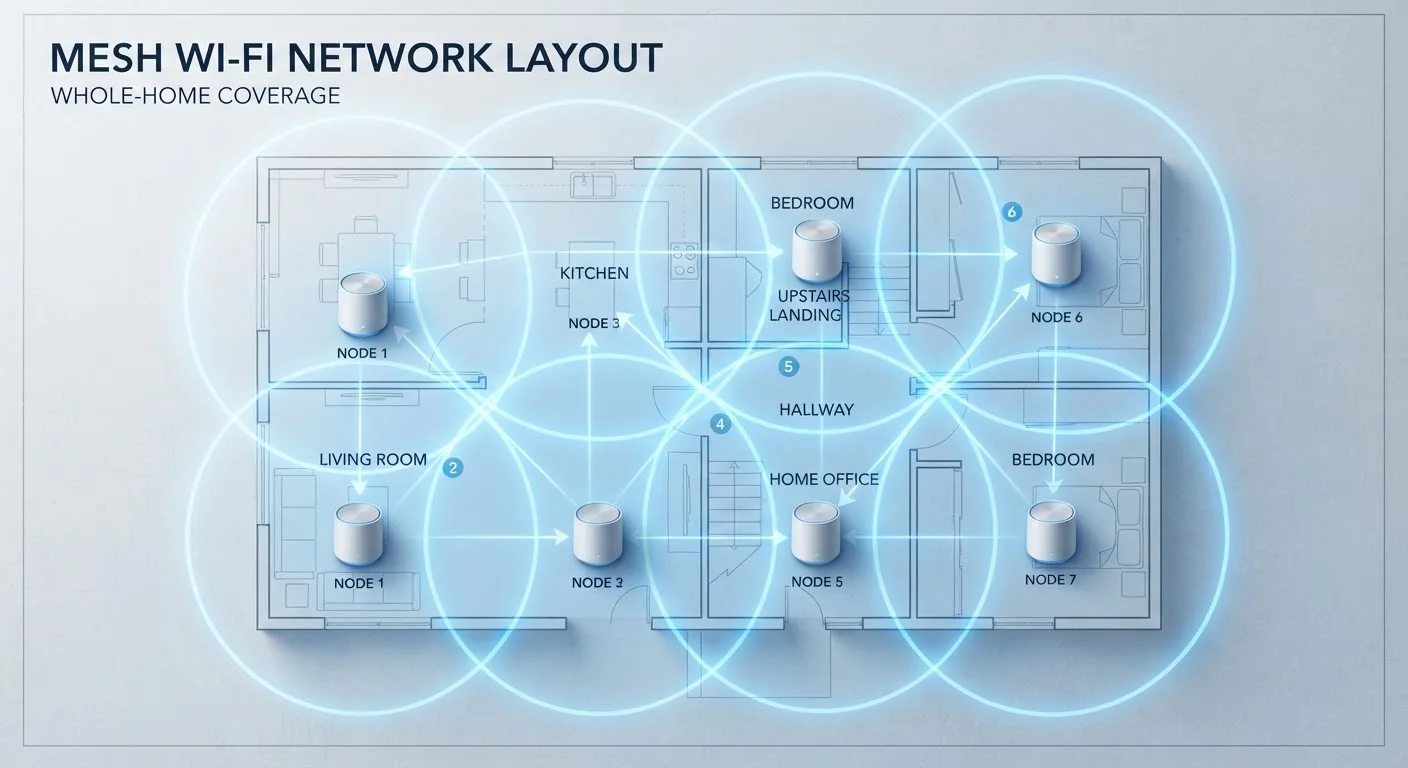
What Mesh Wi-Fi Actually Does
A mesh Wi-Fi system replaces a single router with two or more nodes placed around your home. Each node communicates with the others to form one unified network under a single name and password. Your devices connect to whichever node has the strongest signal as you move through the house — seamlessly, at least in theory.
The core problem mesh addresses is physical range and obstruction. Thick walls, multiple floors, and building materials like concrete or brick absorb and scatter wireless signals. A router placed in one corner of a home often cannot deliver a usable signal to the opposite end. Mesh systems counter this by placing signal sources throughout the space rather than relying on a single transmission point.
What mesh does not do is expand the bandwidth your internet service provider (ISP) delivers to your home. If your plan provides 200 Mbps, every device on your mesh network shares that same 200 Mbps ceiling. The mesh simply distributes what's already there. For context on how wireless standards affect the speeds nodes can handle internally, see our breakdown of Wi-Fi generations.
Common Myths About Mesh Wi-Fi — Corrected
Mesh systems are heavily marketed, which has created a set of persistent misunderstandings about what they deliver. The myth-and-fact pairs below address the most common ones.
Myth
Mesh Wi-Fi makes your internet faster.
Fact
Mesh improves signal distribution, not internet speed. Your ISP plan sets the maximum speed for the entire home.
Speed and coverage are different things. A mesh system can ensure that a device in your garage gets the same strong signal as one next to the router — but neither will exceed the download speed your ISP plan allows. If a previous dead-zone device was getting 10 Mbps due to a weak signal, mesh might bring it up to the full 200 Mbps your plan delivers. That feels faster, but it's really just delivering what was already being paid for.
Myth
More nodes always means better performance.
Fact
Adding nodes beyond what your space needs introduces traffic overhead and can actually slow down the network.
Every node in a wireless mesh must communicate with the others — this inter-node communication is called backhaul. When nodes use the same radio bands as client devices (a common setup called single-band or shared-band backhaul), they consume bandwidth just coordinating with each other. Packing a small home with five nodes creates unnecessary congestion. The right number of nodes depends on square footage, layout, and wall materials — not on the assumption that more hardware equals better results.
Myth
Mesh systems always use a wireless connection between nodes.
Fact
Many mesh systems support wired backhaul, where nodes are connected by an Ethernet cable, which is substantially faster and more reliable.
Wireless backhaul is the default because it requires no additional cabling, but it comes with trade-offs: signal degradation, interference, and reduced throughput between nodes. Most current mesh systems allow you to run an Ethernet cable between nodes instead, eliminating those issues. If your home already has Ethernet ports in walls or you can run cable discreetly, wired backhaul can make a meaningful difference in performance. Wired versus wireless connections carry real trade-offs worth weighing before setup.
Myth
Mesh Wi-Fi eliminates all dead zones, guaranteed.
Fact
Node placement, building materials, and interference sources all affect whether dead zones are fully resolved.
Mesh reduces dead zones but does not automatically eliminate them. A node placed inside a metal cabinet, too far from the next node, or near heavy appliances that emit interference can still leave gaps. Effective mesh setup requires deliberate node placement — ideally halfway between the previous node and the problem area, in open air. Many dead-zone complaints about mesh systems trace back to poor placement rather than the technology itself.
Myth
Mesh is necessary for smart home devices to work reliably.
Fact
Many smart home devices use low-power protocols like Zigbee or Z-Wave that don't rely on Wi-Fi coverage at all.
It's a common assumption that more smart devices require more Wi-Fi coverage. In practice, many smart home sensors, locks, and bulbs communicate over Zigbee, Z-Wave, or Thread — protocols with their own mesh-like range extension built in, independent of your Wi-Fi network. Devices that do use Wi-Fi, like cameras and video doorbells, benefit from strong signal, but a well-placed single router may be sufficient. Understanding what your specific devices actually use is a useful first step before upgrading network infrastructure.
When a Simpler Solution Is Enough
Mesh is genuinely useful in large homes, multi-story buildings, and spaces with heavy structural interference. But many households pay for mesh when a router repositioned to a central location — or replaced with a more capable single unit — would solve the problem just as well.
Apartments, small homes under roughly 1,500 square feet, and open-floor-plan spaces rarely need multiple nodes. A router with strong antennas and a current Wi-Fi standard can cover these environments adequately. If dead zones persist, a single wired access point is often a more cost-effective and higher-performance fix than a full mesh system.
Check Your Modem Before Upgrading Your Router
A mesh system connected to an outdated or ISP-provided modem that bottlenecks throughput will underperform regardless of how many nodes you add. Before purchasing mesh hardware, verify that your modem supports the speeds your ISP plan offers. Some ISPs rent modems that are technically limited to speeds below what customers are paying for.
For households already deep into smart home setups, it's worth noting how your network infrastructure interacts with connected devices. See what smart home hubs actually do for a related look at where network gear ends and smart home coordination begins. And for anyone weighing wireless against physically cabled connections, the trade-offs between wired and wireless setups are worth understanding before committing to any configuration.
The content on this site is for informational purposes only and is not a substitute for professional advice. Always consult a qualified professional for guidance specific to your situation.