

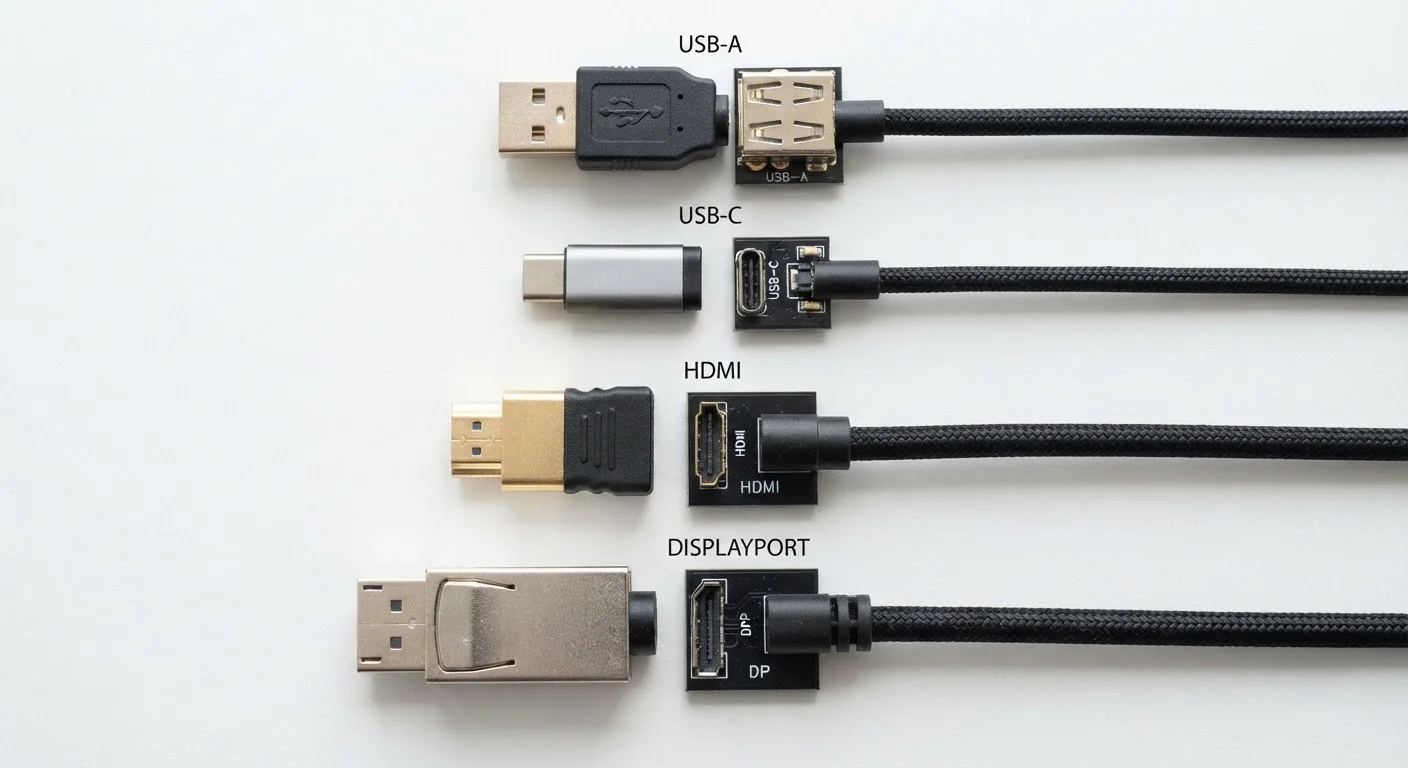
Why Port Labels Matter
Flip over a laptop, glance at the back of a TV, or inspect a phone charger, and you'll encounter a cluster of port labels that can feel like a random alphabet: USB-A, USB-C, HDMI 2.1, DisplayPort 1.4, Thunderbolt 4. These aren't marketing labels — they're published technical standards that define exactly how fast data moves, how much power a cable can deliver, and what video resolutions a connection can carry. Understanding them takes the guesswork out of buying cables, docks, and accessories. For a broader look at how device labels communicate technical specs, see our electronics label reference.
| USB-C max power delivery | Up to 240W (USB PD 3.1 spec) (USB Implementers Forum specification) |
| USB4 max data rate | 40 Gbps (USB Implementers Forum, USB4 specification) |
| HDMI 2.1 max bandwidth | 48 Gbps (HDMI Forum specification) |
| DisplayPort 2.1 max bandwidth | 77.4 Gbps (VESA DisplayPort 2.1 specification) |
| Thunderbolt 4 guaranteed data rate | 40 Gbps (Intel Thunderbolt 4 specification) |
| USB 2.0 max speed | 480 Mbps (USB Implementers Forum) |
USB: The Universal Standard That Isn't Quite Universal
USB (Universal Serial Bus) is the most common wired connection standard in consumer electronics. The confusion arises because USB describes a family of standards, not a single cable type. Two things vary independently: the connector shape and the underlying data/power protocol.
Connector Shapes
- USB-A — the rectangular plug most people think of as a classic USB. Found on chargers, computers, and flash drives. Does not support reversible insertion.
- USB-B — square-ish plug once common on printers and older hard drives; increasingly rare.
- Micro-USB — small trapezoidal connector; largely replaced by USB-C on newer devices.
- USB-C — oval, reversible connector used across phones, laptops, tablets, and accessories. The same physical plug can carry wildly different capabilities depending on the protocol inside.
Speed Protocols
The USB Implementers Forum periodically releases new speed specifications. USB 2.0 tops out at 480 Mbps — sufficient for keyboards and mice. USB 3.2 Gen 1 reaches 5 Gbps; Gen 2 doubles that to 10 Gbps; Gen 2×2 hits 20 Gbps. USB4 (no space) reaches 40 Gbps and is backward-compatible with many older standards. A USB-C cable doesn't automatically mean fast speeds — the spec printed on the device or cable determines actual throughput.
Cable Quality Can Limit Rated Speeds
Not all USB-C cables are built to carry the same load. A cable that ships with a low-cost charger may only support USB 2.0 speeds and 15W of power, even if it fits a USB4 port perfectly. When high-speed data transfer or fast charging matters, look for cables that explicitly state the supported spec — such as 'USB 3.2 Gen 2' or 'USB PD 100W' — on the packaging or product listing.
For context on how these speeds relate to overall device performance, our guide to storage, RAM, and processing power explains how data pathways interact with your device's other specs.
HDMI and DisplayPort: Video Connections Explained
Video ports transmit audio and visual data from a source device — a computer, streaming box, or gaming console — to a display. HDMI and DisplayPort are the two dominant standards, and both have gone through numbered versions that significantly change their capabilities.
48 Gbps
HDMI 2.1 total bandwidth
Per the HDMI Forum specification — roughly three times the bandwidth of HDMI 2.0's 18 Gbps ceiling.
240W
Max USB Power Delivery (USB PD 3.1)
USB PD 3.1, ratified by the USB Implementers Forum, extends USB-C charging to power larger laptops and workstations.
40 Gbps
Thunderbolt 4 and USB4 data ceiling
Both standards share the same peak throughput, though Thunderbolt 4 mandates additional display and PCIe requirements.
HDMI Versions
- HDMI 1.4 — supports 4K at 30 Hz; common on older TVs and devices still in use.
- HDMI 2.0 — raises 4K support to 60 Hz; the baseline for most current mid-range TVs.
- HDMI 2.1 — supports 4K at 120 Hz and 8K at 60 Hz; required for high-refresh-rate gaming and future-proof display connections. Variable Refresh Rate (VRR) and Auto Low Latency Mode (ALLM) are also part of this spec.
DisplayPort
DisplayPort is common on computer monitors and laptops. Version 1.4 supports 8K at 60 Hz using Display Stream Compression (DSC). DisplayPort 2.1, the current generation, reaches up to 77.4 Gbps of bandwidth — enough for 16K or multiple 4K screens from a single port. It's also available in a Mini DisplayPort form factor on some devices.
If you're connecting a streaming device to your TV and wondering which port to use, our streaming hardware comparison covers how input types affect real-world picture quality.
Thunderbolt: A Port Within a Port
Thunderbolt is Intel's high-speed protocol that uses the USB-C physical connector but adds proprietary capabilities. Thunderbolt 4 — the current widely-deployed version — guarantees 40 Gbps data transfer, support for two 4K displays or one 8K display, up to 100W power delivery, and PCIe tunneling for external GPUs or high-speed storage enclosures. A Thunderbolt port will run USB-C devices without issue, but a USB-C cable plugged into a Thunderbolt port won't unlock Thunderbolt's full capabilities unless the cable itself is Thunderbolt-certified. Devices certified for Thunderbolt display a small lightning-bolt icon next to the port. For a parallel look at wireless connectivity standards, our wireless standards explainer covers Wi-Fi, Bluetooth, and 5G generations in the same plain-language format.
Bandwidth
The maximum amount of data a connection can carry per second, usually measured in Gbps (gigabits per second). Higher bandwidth allows higher resolutions, faster transfers, and more simultaneous data streams.
USB Power Delivery (USB PD)
A charging protocol built into the USB standard that allows devices to negotiate higher voltages and currents over a USB-C cable. It enables a single cable to charge everything from earbuds to laptops.
Variable Refresh Rate (VRR)
A display technology — enabled through HDMI 2.1 or DisplayPort — that lets a monitor or TV adjust its refresh rate to match the frame rate output by a connected device, reducing screen tearing.
Thunderbolt
A high-speed wired interface developed by Intel that uses the USB-C connector but adds certified support for 40 Gbps data, video output, and PCIe peripherals. Requires Thunderbolt-certified cables and devices to unlock full capability.
PCIe Tunneling
A feature of Thunderbolt that allows PCIe (Peripheral Component Interconnect Express) signals — typically used inside a computer — to travel over a cable, enabling external devices like GPUs or NVMe storage enclosures.
Refresh Rate (Hz)
The number of times per second a display updates the image, measured in Hertz (Hz). Higher refresh rates, such as 120 Hz, produce smoother motion — relevant when choosing which HDMI or DisplayPort version a connection requires.
The content on this site is for informational purposes only and is not a substitute for professional advice. Always consult a qualified professional for guidance specific to your situation.